Ver categorias
Explorar
Fiverr Pro
Português
$
USD



The ads that carried your store for months stopped working, and new ones fade in a few days. Same spend, fewer sales every week.
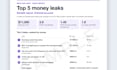
This audit shows why, ranked by what it costs you:
Free before you order: send your Events Manager overview, or your ads with spend, frequency and CTR for the last 30 days, and get a 2-4 line read.
I'm ex-Google (Google Ads and the Tags team), so tracking gets checked properly before anyone blames the creatives. And the next ads can be made here too, from your own product photos.
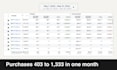
One handbag brand I ran Meta for in 2026: about the same spend, 33% more purchases over 60 days.
Basic: the top 5, each with the exact fix. Clean account? You'll hear that too.
Standard: every campaign, Meta vs your Shopify orders by week, angles to test next, 30-day plan + video.
Premium: Standard plus the top 5 fixes made, then a re-check ~day 14 in the chat.
for Shopify stores spending $2K-50K/month on Meta
Google and Meta Ads, plus the creatives and landing pages that match
Idiomas
What's in the $60 Basic report?
2-3 pages. Your 5 biggest problems in Meta, ranked by what each costs a month: the creative, the budget split, the pixel or the page. What was found, why it costs money, the steps to fix it, each tied to an ad, ad set or event in your account.
Why did my ads stop working?
Most of the time it's a mix: the winning angle got worn out, new ads get too little budget to prove themselves, or Meta learns from purchases that aren't real. The audit tells you which one it is in your account, with the numbers.
What access do you need, and what do the fixes cover?
Your Business ID (Business settings > Business info). You approve a partner request for the ad account and pixel. No passwords. Basic and Standard change nothing. Fixes are settings, budgets, exclusions and pausing worn ads.
Meta and Shopify show different numbers. Which one is right?
Neither on its own. Meta counts a sale if someone clicked or saw an ad inside its window, Shopify can't see that at all. The audit puts both side by side so you know what Meta really brings.
Can you make the new ads too?
Yes. Standard and Premium come with the angles to test next. Want them made? The "Three new static ads" extra builds them from your product photos, ready to upload. Bigger batches or video: message first.
What's the re-check in Premium?
About 14 days after delivery, Meta's purchases for those days go next to your Shopify orders and you get a short read here: did the gap move, is anything still off. Keep the access until then.
Do you guarantee more sales or a higher ROAS?
No. Sales depend on your offer, store, price and budget too. You get a clear, ranked list of what's holding the ads back and what to do about each.
My store isn't on Shopify. Can I still order?
Yes, WooCommerce and other platforms work too. The creative and account parts are the same, only the CAPI check changes a bit. Message first if you're not sure.
Who does the work, and do you use AI?
I do, and you talk to me the whole way. Claude does the first pass on the data, every line is checked before it reaches you. Ads made with the extra use AI images built from your real product photos. Want no AI? Say so before ordering and I'll tell you if that changes the price or the timing.
Can you run the ads after the audit?
Yes, as a monthly offer sent here on Fiverr after delivery. Start within 30 days and the audit fee comes off month 1. Everything stays in your own Business Manager either way.


